This is a live demo — click the dots. The same popup runs on your storefront.
What “Shop the Look” actually means
Shop the Look is a storefront section built around a styled photo — an outfit on a model, a furnished corner of a room, a layered jewelry stack. Every product in the photo is tagged with a hotspot: a small marker a shopper can tap to see the item, its live price, its variants, and an add-to-cart button. A “buy the look” action adds the whole set in one click.
It comes from lookbooks — the printed kind fashion brands have used for a century — and it works online for the same reason it worked on paper: people buy styling, not SKUs. A product page shows one item in isolation. A look shows what it’s for: what it pairs with, how it falls, what the finished result looks like.
Why it lifts average order value
The shopper who came for the jacket has already made a purchase decision. Shop the Look lets the boots and the tote ride along on that same decision instead of requiring three separate ones. Three things do the heavy lifting:
- Discovery without a detour — every extra item is visible and buyable in place. No search, no “you may also like” gamble, no leaving the page.
- Proof of pairing — the photo itself answers “will these work together?”, the question that kills most cross-sells.
- A reason to buy the set — a bundle discount scoped to the look turns “I’ll think about the rest” into “the set is the better deal today”.
That’s also why a half-hearted implementation underdelivers: a gallery that merely links to product pages sends shoppers away at the exact moment they were ready to add. The section has to complete the sale in place.
What a converting look section needs
Judge any Shop the Look implementation — an app or a custom build — against these six points.
Sells in place
Live price, a variant picker, and honest add-to-cart inside the popup — not a link that dumps the shopper on another page.
One-click whole look
A single action adds every item — or opens a picker with variant selects and a live running total for the whole set.
A real set incentive
An automatic discount that applies only to items bought from the look — struck-through prices at checkout, not a coupon code to copy.
A mobile-first crop
A separate phone image with its own hotspot positions. A desktop-wide shot squeezed onto a phone puts dots on the wrong products.
Graceful stock states
When one item of the look sells out, its hotspot should say so — not offer a buyable button that fails at the cart.
Proof, not vibes
Revenue attribution per look and per hotspot. If you can’t see which image earned which orders, you can’t improve anything.
The whole outfit, one click
Hotspot Studio’s Shop the Look adds every product in the photo to the cart in a single click — or opens a premium picker where shoppers choose sizes and colors per item and watch the set’s total update live.
- Variant-aware — each row carries its own variant selects, so “the look” never means “the wrong size”.
- Live total — the set price (and the discount, if you run one) recalculates as shoppers swap variants.
- Recommendations included — frequently-bought-together suggestions live inside every popup, not in a separate widget.
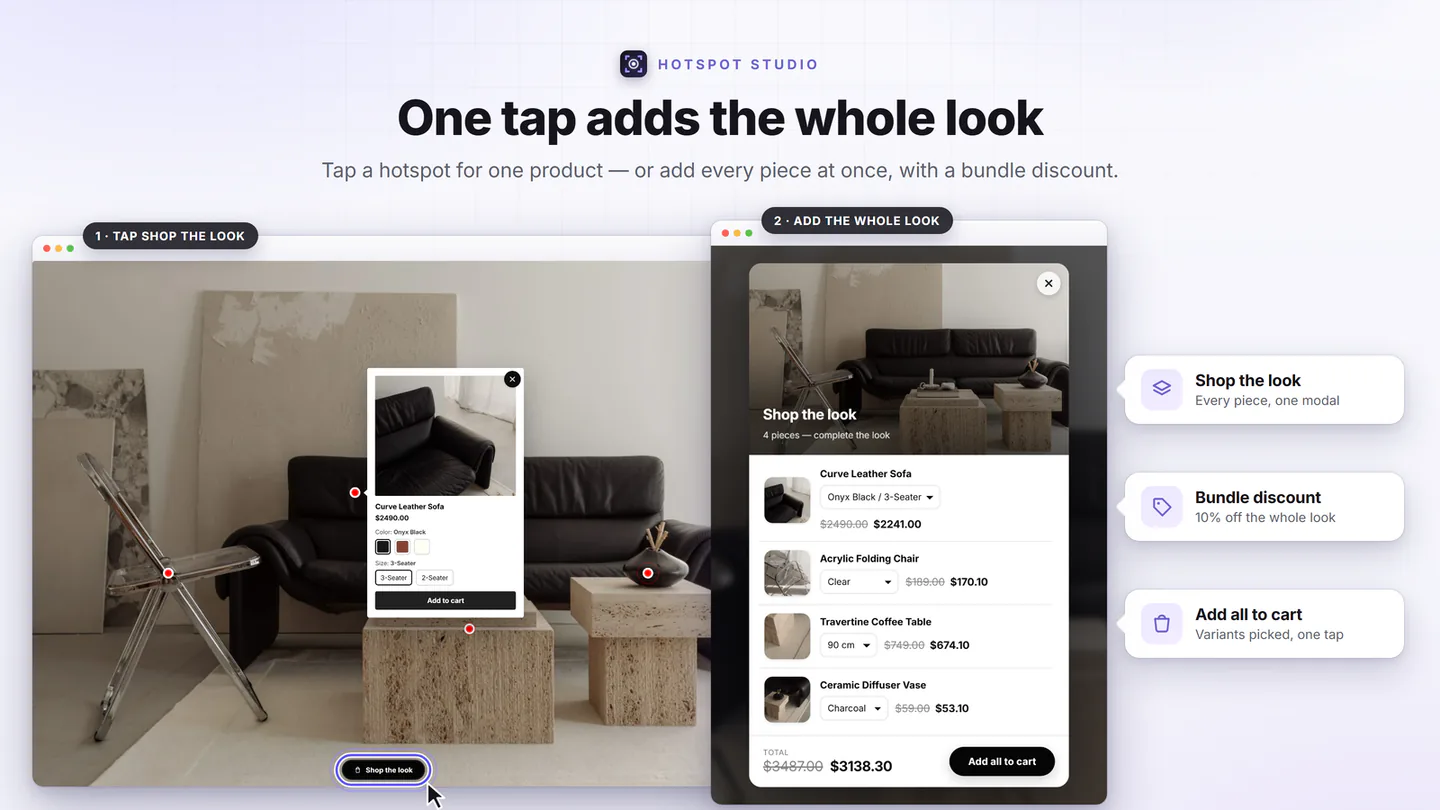
A deal shoppers can only get from the look
The set needs a reason. Hotspot Studio creates genuine Shopify automatic discounts, applied at checkout by a discount function and scoped to your section — so the deal rewards buying from the image, and the rest of your catalog keeps full price.
- Honest struck-through prices — shoppers see the saving in the popup and in the cart, not on a banner they have to trust.
- Per-hotspot or whole-look — discount one hero item or the complete bundle.
- Stacking under your control — decide how look deals combine with your other promotions.
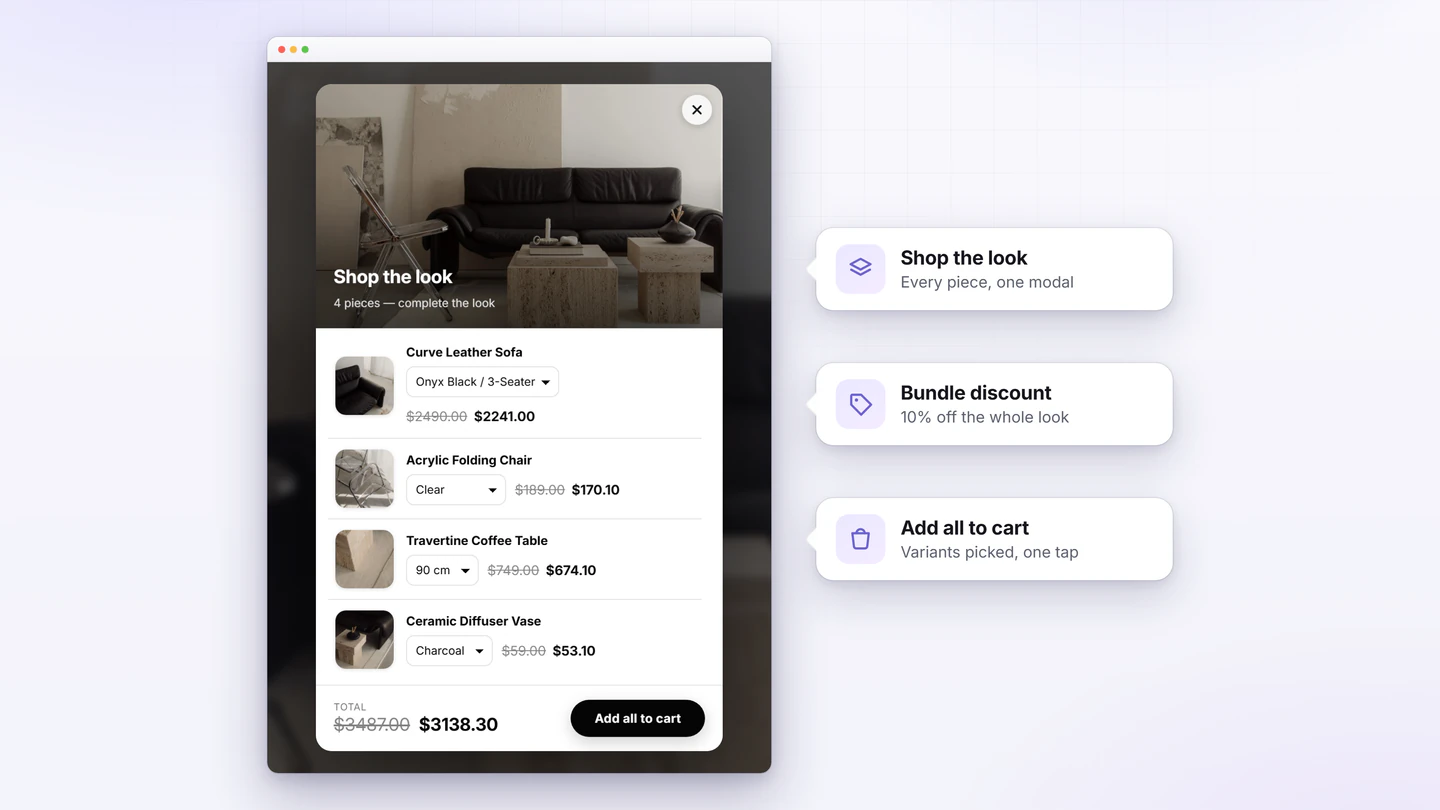
Know which look made the sale
Every add-to-cart made through the section invisibly tags the order. Revenue lands on the exact look — and the exact hotspot — that earned it, and refunds subtract automatically. That turns “looks nice” into a number you can act on.
- Full funnel per image — impressions → clicks → add-to-carts → orders → attributed revenue.
- Trends, devices, peak hours — in your store’s timezone, with CSV export of everything.
- No cookies, no profiling — attribution works through order line-item properties, so there’s nothing to consent-gate.
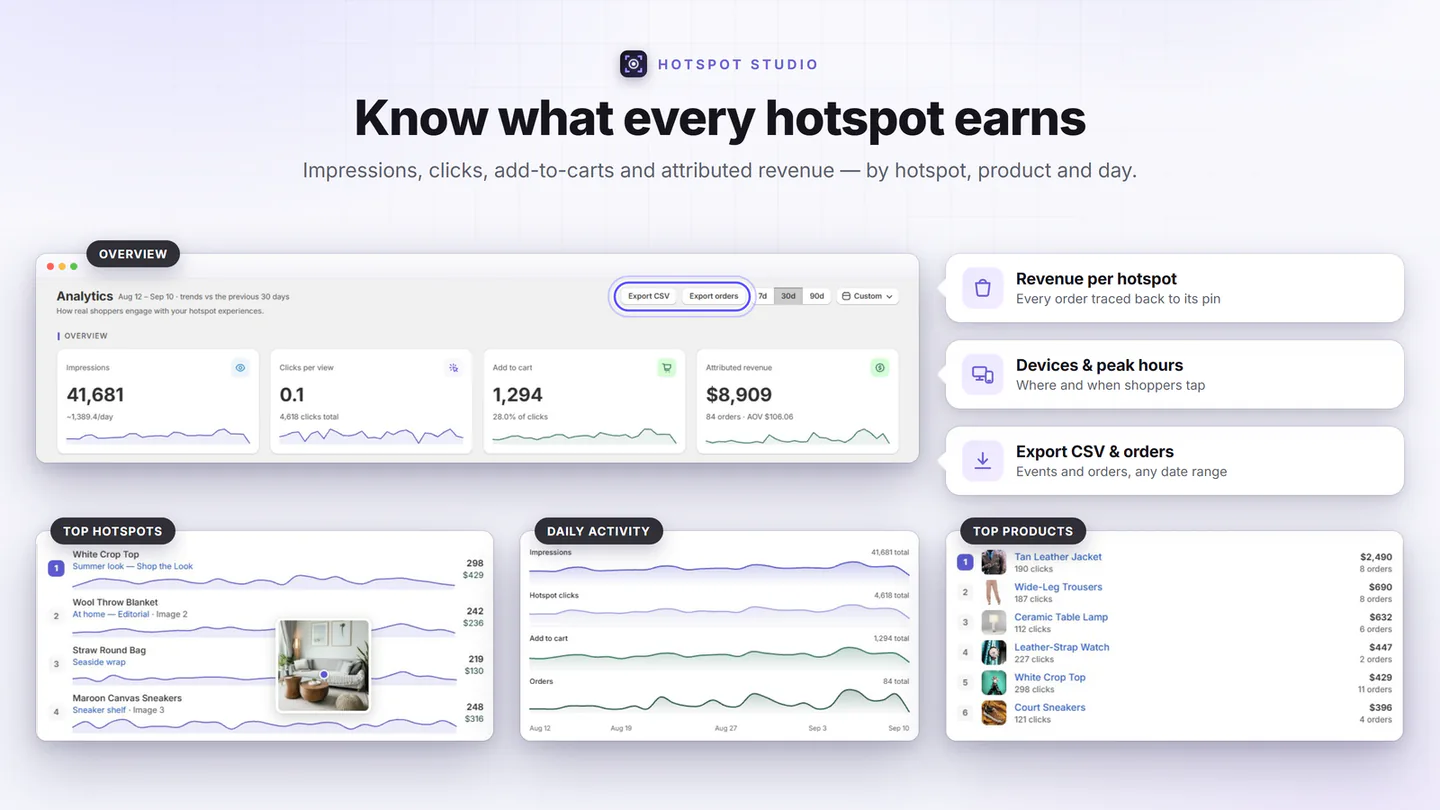
Add a Shop the Look section without touching code
Tag the photo
Upload your lifestyle shot — or start from a template — and drop a hotspot on each product in it, or let AI suggest the pins. Add a tighter mobile crop with its own dot positions.
Turn on Shop the Look
Enable the one-click look button (or the premium picker), set an optional look discount, and style everything to your brand with presets.
Publish anywhere
Assign the look to products, variants, whole collections, specific pages, blog posts or the home page for automatic placement — no theme editing per page.
Can you build it without an app?
Yes — a developer can model looks with metafields, render them with custom Liquid, and wire up the cart with theme JavaScript. It’s a fair path if you have in-house development and a design that no app matches. The trade-offs are real, though: every new look needs coordinates typed by hand, variants and out-of-stock states are yours to handle, discounts scoped to the section require a Shopify Functions app of its own, and there’s no attribution unless you build that too. Most stores get further, faster by letting an app own the plumbing and spending their time on photography — the part that actually differentiates a look.
Shop the Look questions, answered
What is Shop the Look on Shopify?
A storefront section built around a styled lifestyle photo — an outfit, a furnished room, a layered jewelry look. Every product in the photo is tagged with a hotspot, and shoppers can open each item, pick a variant, and add the entire look to the cart in one click, without leaving the image.
Why does it increase average order value?
Because it sells the styling, not a single SKU. A shopper who came for the jacket sees the whole outfit working together and gets a one-click way to buy it as a set — the extra items ride along on a purchase decision that was already made. A bundle discount scoped to the look gives the set a concrete reason to win.
Do I need a developer to add it?
Not with an app. Hotspot Studio is a standard Online Store 2.0 app block: upload a photo, drop hotspots, add the block from the theme editor. Nothing is injected into your theme code, and uninstalling leaves no trace. A hand-built alternative is possible but needs a developer for every future change.
Can the discount apply only to items bought from the look?
Yes — that’s exactly what section-scoped automatic discounts are for. The app creates a genuine Shopify automatic discount applied at checkout by a discount function, and it only applies to items added from your section. You control how it stacks with your other promotions.
How do I know if my look section actually sells?
Attribution. Every add-to-cart made through the app invisibly tags the order, so revenue lands on the section that earned it, and on the exact hotspot for adds from a popup — and refunds subtract automatically. You see the full funnel per image, not just gallery-wide click counts.
Does it work on mobile?
It has to — most storefront traffic is mobile. Hotspot Studio lets you upload a separate mobile image (a tighter crop usually works better on phones) with independent hotspot coordinates per device, so the dots sit exactly on the products in both versions.
Shoppable image galleries
The wider playbook: six gallery layouts, hotspot anatomy, and where shoppable images work beyond the product page.
Best Shop the Look apps compared
An honest, fact-checked comparison of the Shopify apps in this niche — including where each one is genuinely good.
Shop the Look on the Dawn theme
What Shopify’s classic Dawn theme can do on its own, where it stops, and a five-step no-code setup for Dawn stores.
Publish your first look today
Free plan included, paid plans from $7.99/mo with a 7-day trial — and the photo you already have is enough to start.