A full product page, condensed into a popup
Four hotspot types — Product, Collection, Information, and Link — placed by clicking directly on the image and repositioned by dragging.
- Live prices, always current — fetched from your store at view time (Shopify Markets aware, your money format respected), with optional min–max price ranges.
- Variant picker in the popup — sell the whole product, a hand-picked subset of variants, or pin one exact variant. Sold-out variants show as disabled, never silently swapped.
- Real add to cart — with honest error handling: “sold out” or “you can only add 2” shows right in the popup, not a generic failure.
- Four description sources — none, the product’s description, your own rich text, or a product metafield.
- Out-of-stock protection — an unavailable product gets a disabled button with your “Out of stock” label instead of a buyable CTA that fails.
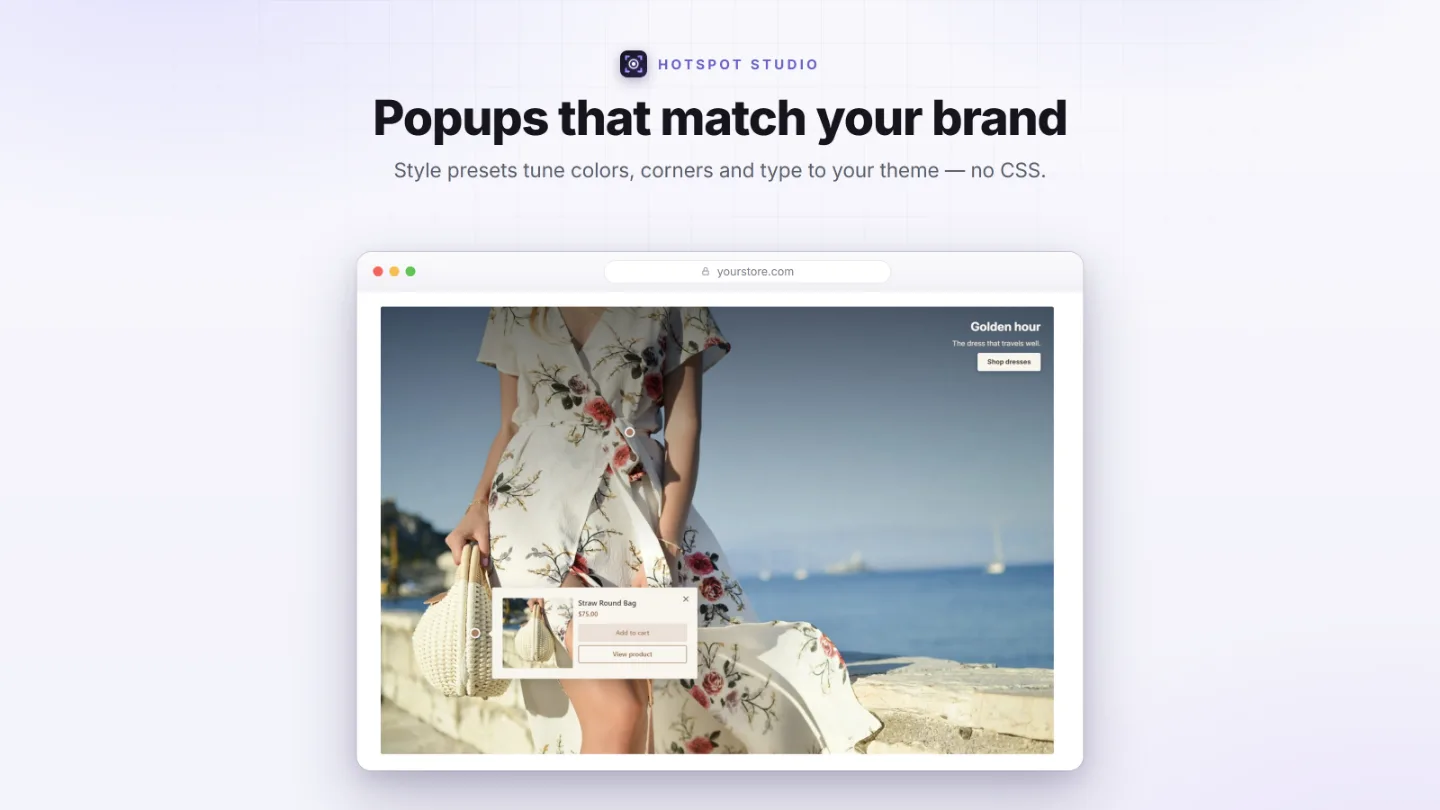
- Smart placement — anchored popups pick the best side, point at their dot with an arrow, never cover it, and never get clipped by the viewport. Or open them as a centered window (one taller than a phone screen scrolls inside it), or as a card along the bottom of the image.
- Link hotspots — six targets: product, collection, page, blog, article, or an external URL. Info hotspots carry a title and rich text.
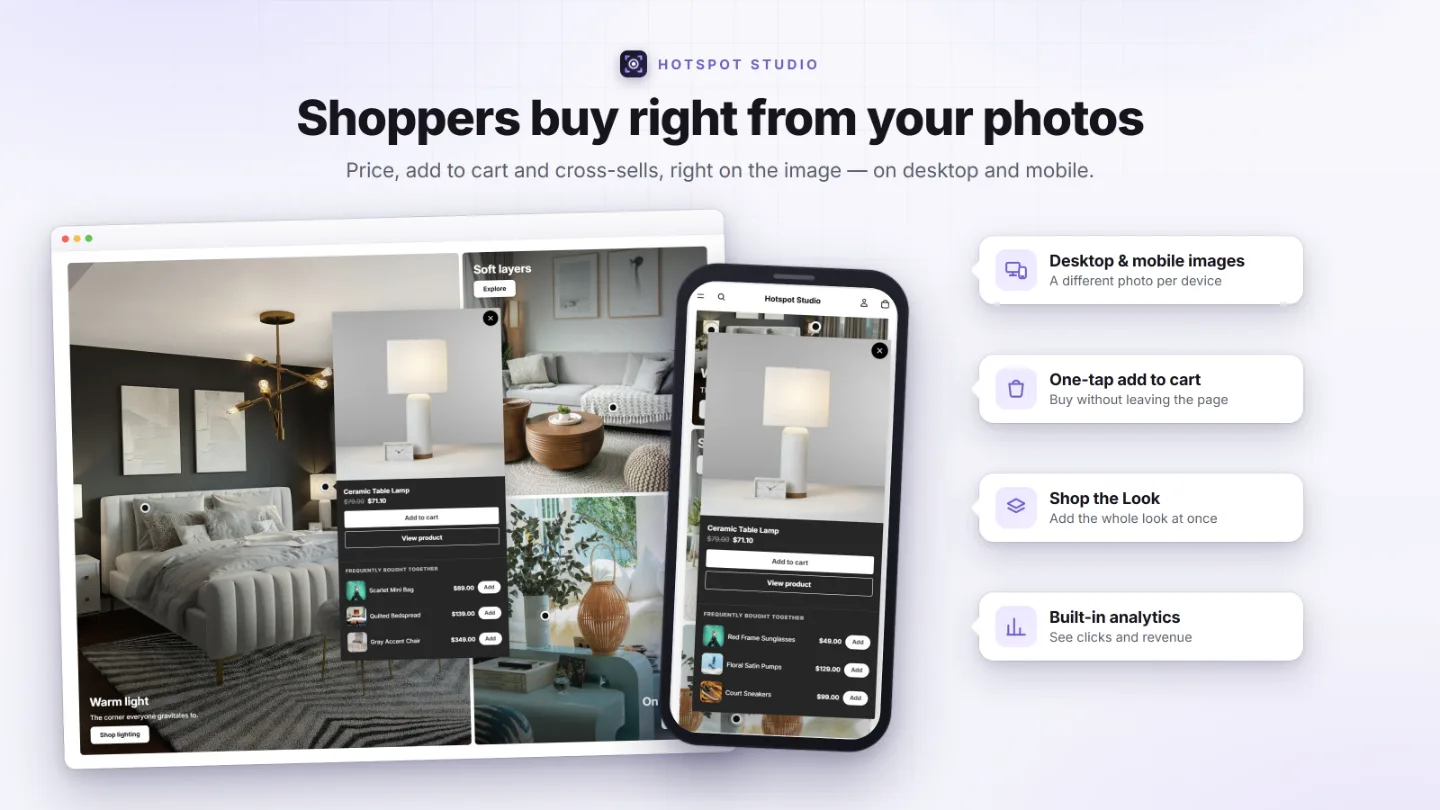
A different image for mobile — with its own hotspots
A wide desktop banner crops terribly on a phone. Hotspot Studio treats mobile as a first-class citizen, not an afterthought.
- Separate desktop and mobile images — upload a tall crop (or a completely different photo) for phones; mobile falls back to desktop when you don’t need it. The built-in crop tool cuts a phone version from the desktop shot in seconds.
- Independent hotspot coordinates per device — a Desktop/Mobile toggle in the editor lets you place every dot exactly where the product sits on each image.
- Per-device marker sizes — separate desktop and mobile size sliders (40–200% of the preset).
- The popup under the photo — on single-image sections, a phone can open the popup in the page right under the image instead of over it, and moving from one hotspot to the next is animated.
- Tablets in between — the popup’s position and width, the caption’s position and offsets, and the Shop the Look button’s spot can each be set apart for tablets, from 750px up to a width you choose.
- Per-element mobile visibility — hide a caption’s heading, text, or button on phones independently.
- Video supported too — either slot can hold a video, with poster and processing states handled for you.
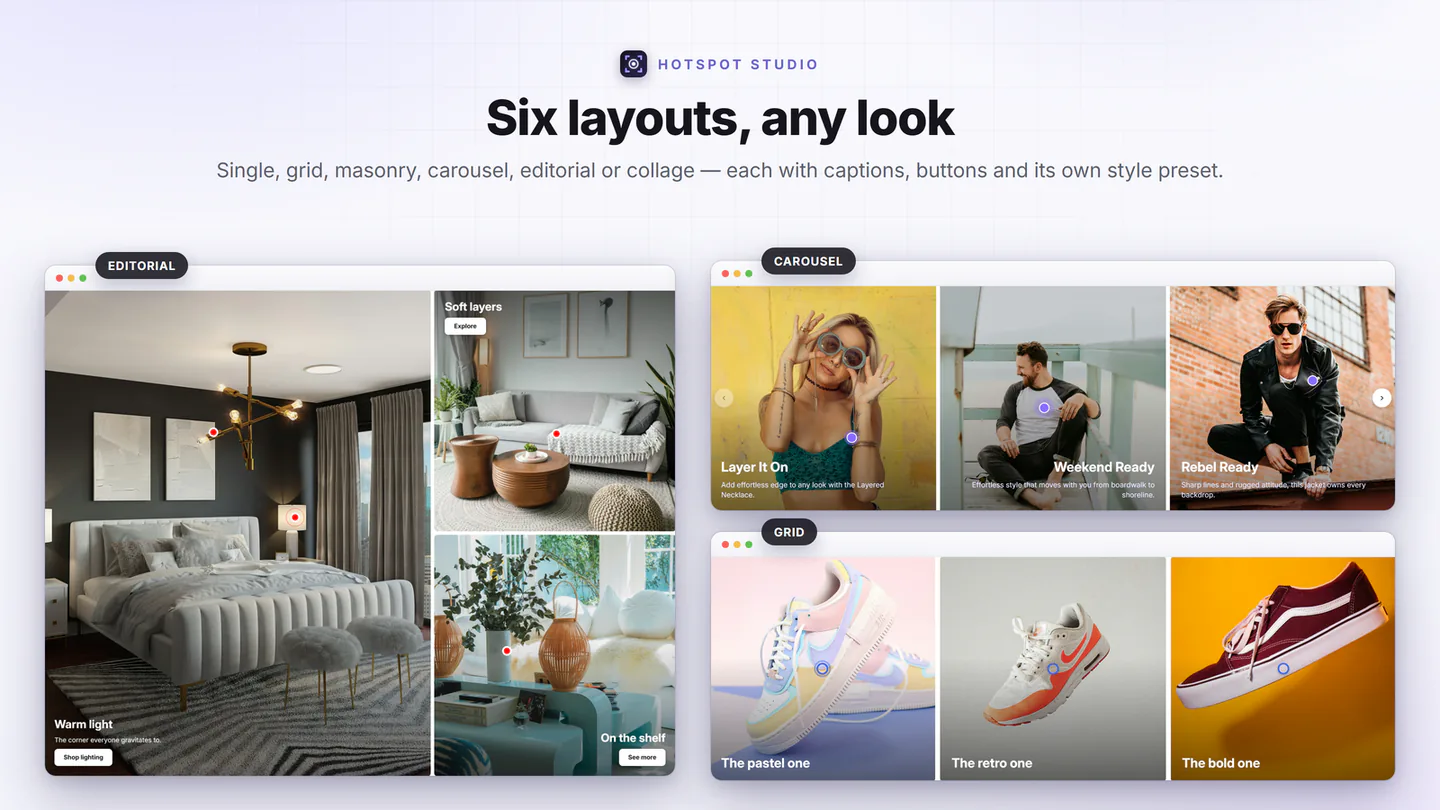
Grid, masonry, editorial, collage, carousel or a single hero
Every tile in every layout is a complete hotspot canvas with its own image, caption, background, and popups.
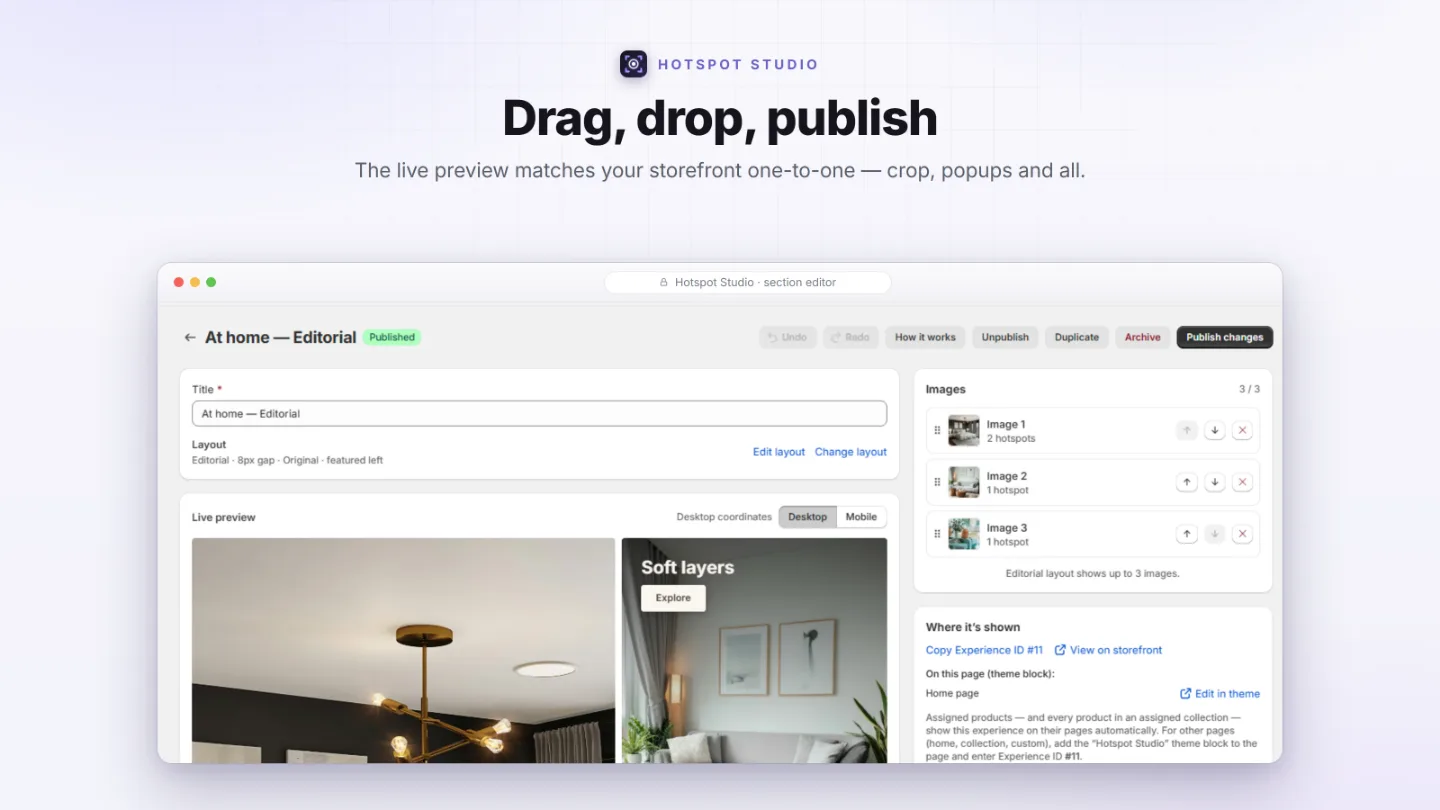
- Single — one hero image. Editorial — a featured image (left or right, three width ratios) with two stacked beside it. Collage — a six-image magazine arrangement.
- Grid & Masonry — up to 48 images, 1–6 columns on Grid (2–6 on Masonry), adjustable gap; Grid adds an image-shape control (original, square, portrait, landscape) and rows that alternate — two wide looks, then three narrow — while Masonry keeps natural staggered heights.
- Phone patterns — Grid and Collage can show 1 or 2 images per row on phones, or rows of 1 and 2 in turn.
- Carousel — up to 12 slides on buttery native scroll-snap: 1–4 per view (1–2 on phones), arrows / dots / a draggable scrollbar / or nothing, optional infinite loop, custom arrow images, and a “hide navigation on phones” mode.
- Non-destructive switching — images are one shared pool; changing layouts never deletes anything.
- Captions everywhere — every image can carry a heading, rich text, and a button in five spots on the image — or beside it on single-image sections — with a readability shade that keeps text legible on busy photos.
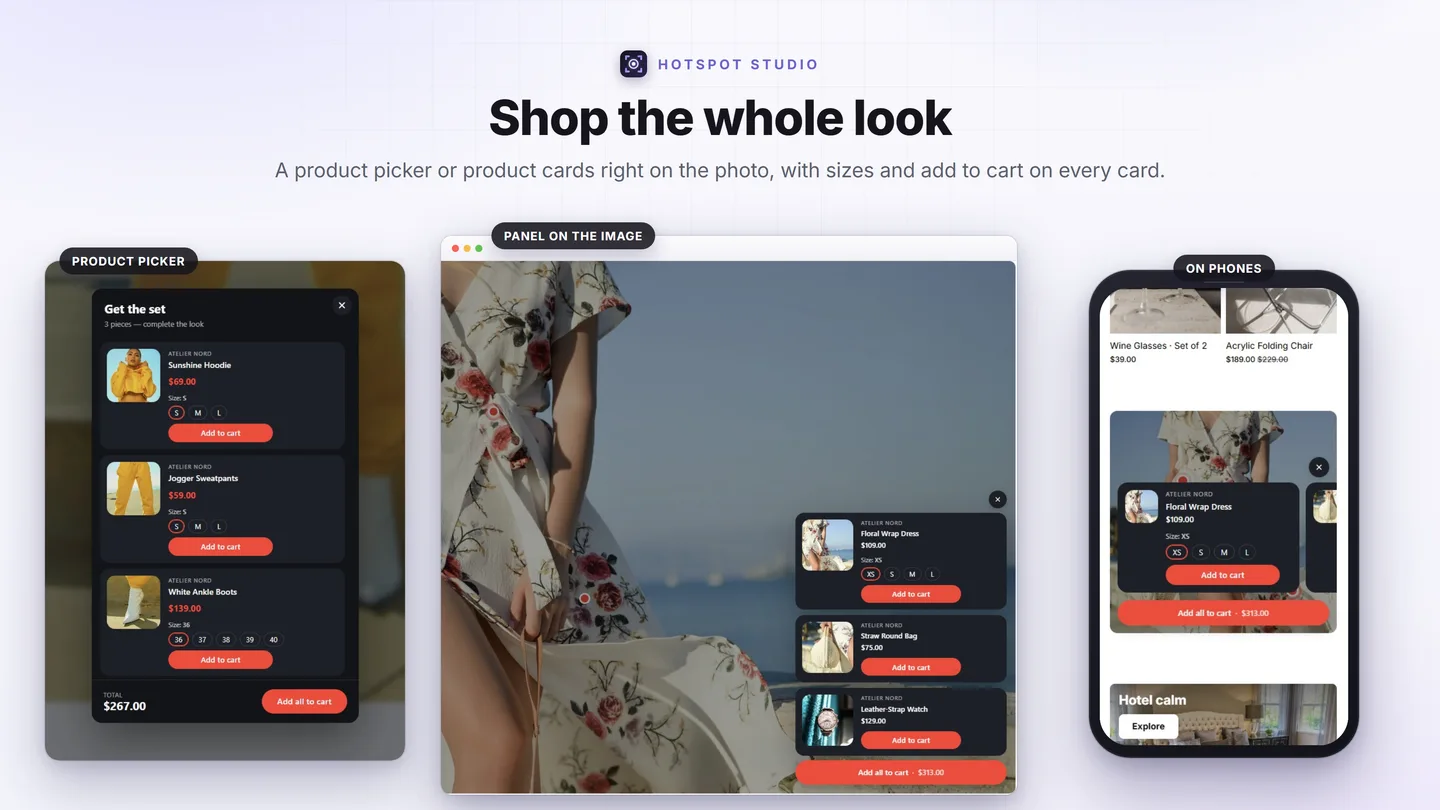
Shop the Look: a picker, a panel or a list — your call
The products you tag on the photo — or choose by hand — become one look. Pick how shoppers meet it, per section.
- Product picker — a window with a row per product: photo, price, a variant menu or swatches, a live total and one “Add all to cart”, under your own heading and subtitle.
- Panel on the image — product cards open in the photo’s corner over a dimmed image, as a sheet or as floating cards, and as a swipeable slider along the bottom on phones. Closes with ×, Esc or a click outside.
- Beside the image — on single-image sections, the products are listed next to the photo, always visible: left or right, stacked under the photo on phones. You set the image width, the list’s minimum width and an optional “Add all” button.
- Straight to the cart — no window at all: one click adds every available product.
- Cards that sell — Add to cart or View product on each card (View product opens the exact variant chosen), a variant menu or color swatches, the brand and the price; a sold-out product says so, and the rest of the look still adds.
- Fully on-brand — the picker, the panel and the list share one card design from your style preset: outline, corners, photo size and shape, button styles, text sizes and colors.
A look per image, products by hand, a button where you want it
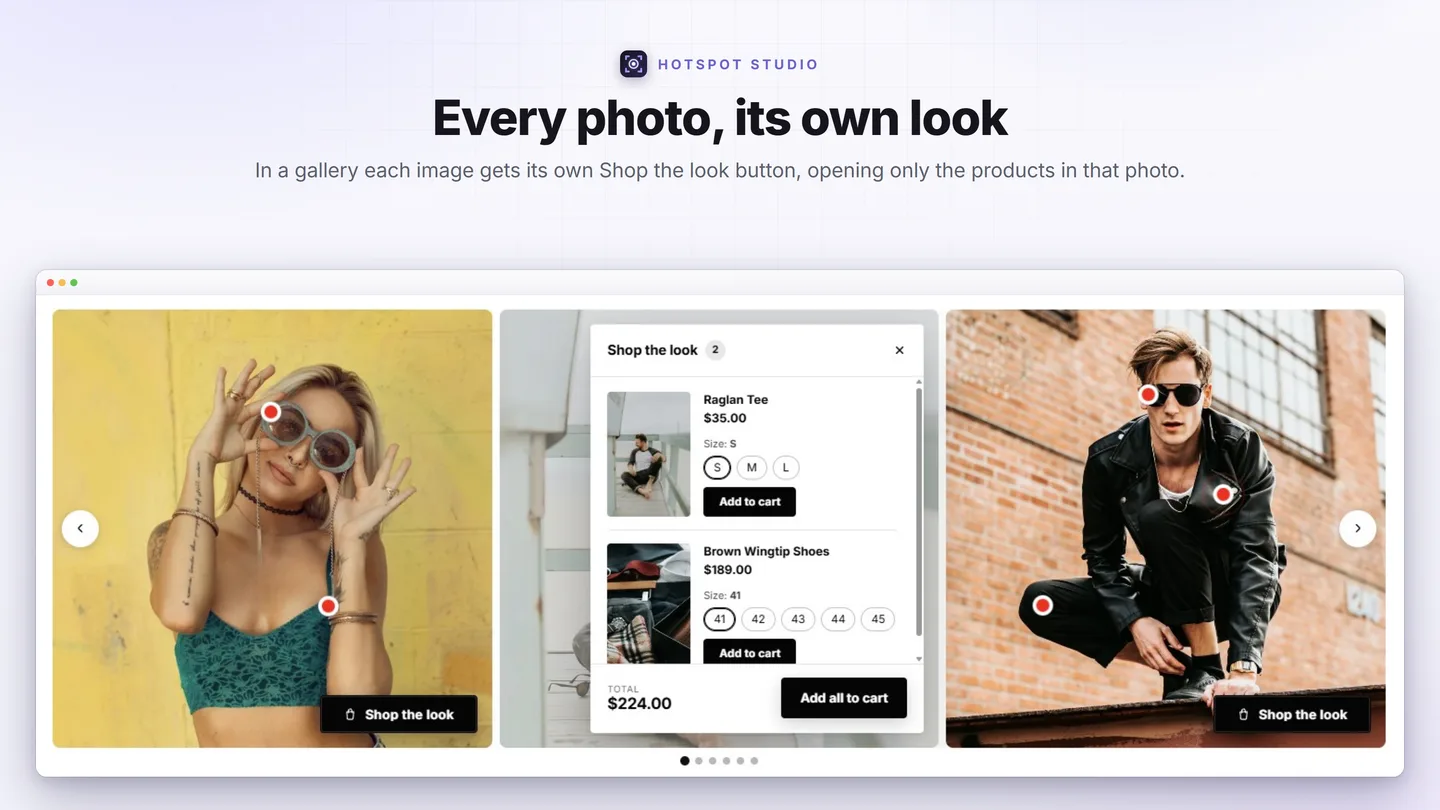
In a gallery the look can change from photo to photo — the way a real lookbook works.
- Own look for each image — in Grid, Masonry, Carousel, Editorial and Collage, every image with something to buy gets its own button that opens only that photo’s products, under its own heading. Images with nothing to buy simply have no button.
- Picker, panel or straight to the cart — the image buttons open a picker, product cards on that image, or add the set at once. Keep a button under the gallery for the whole set, or drop it.
- Hotspots or hand-picked — build a look from the tagged products, or choose the products yourself, drag them into order and let a product offer only some of its variants. It works with no hotspots at all.
- The button, placed — six spots on the image and three below it, its own spot on phones, offsets that can match your caption, and an icon: eight built-in or your own.
- From a caption — a caption’s button can open the look, so the photo needs no second button.
- Frequently bought together · Growth — Shopify’s automatic recommendations or your hand-picked products (1–3), quick-addable right inside a product popup. Prefetched during idle time so it appears instantly.
Real Shopify discounts, scoped to your section
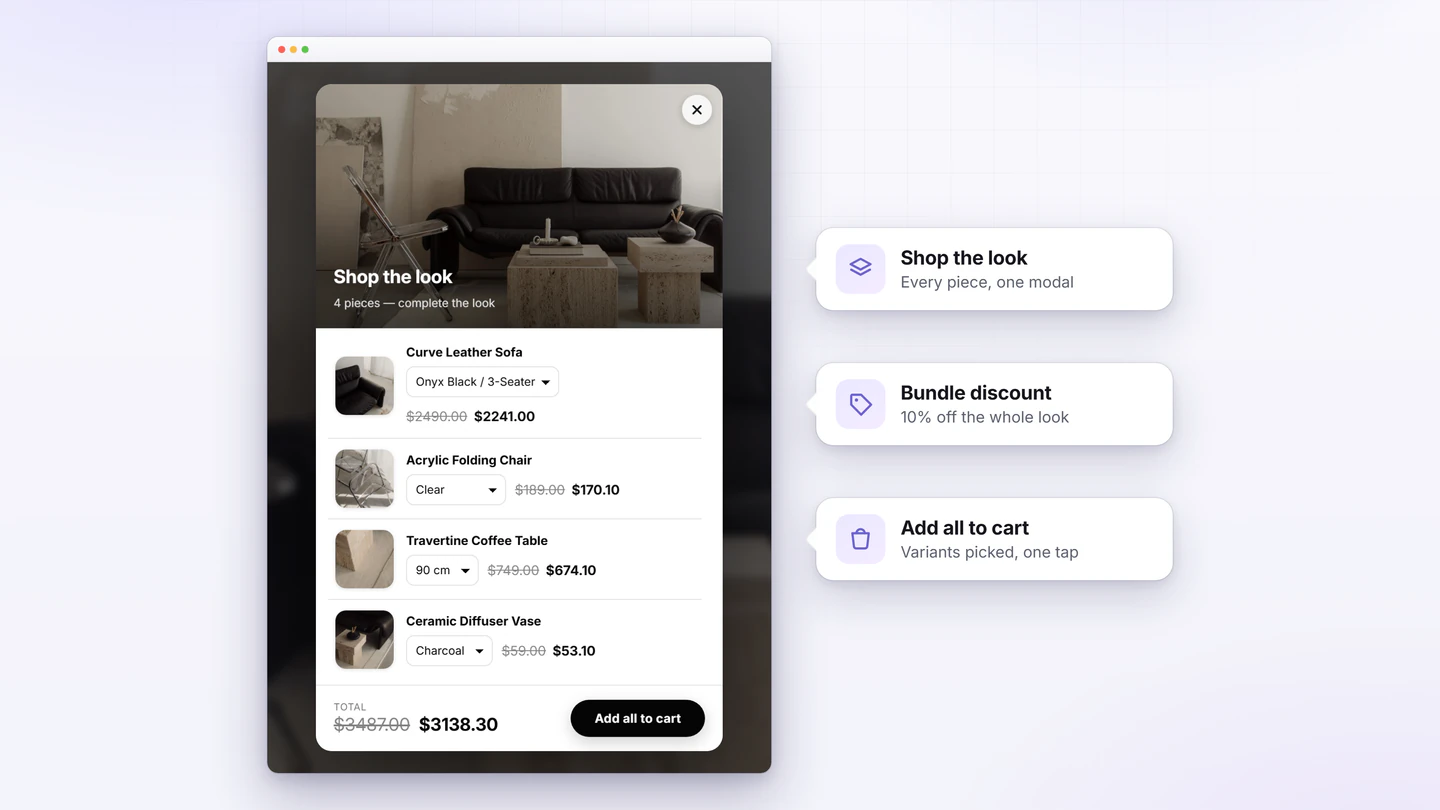
Not a fake strikethrough — a genuine Shopify automatic discount created and managed for you, applied at checkout by a discount function.
- Per-product sales — percentage or fixed amount off any tagged product, with the struck-through original price shown in the popup and variant picker.
- Bundle deals — a Shop-the-Look discount off the whole outfit, reflected per row and in the running total.
- Section-scoped — the deal applies only to items added from your image; adding the same product elsewhere doesn’t get the price. That’s what makes it a reason to engage.
- Stacking under your control — choose whether it combines with product, order, and shipping discounts.
Seven designer presets. Twelve groups of settings.
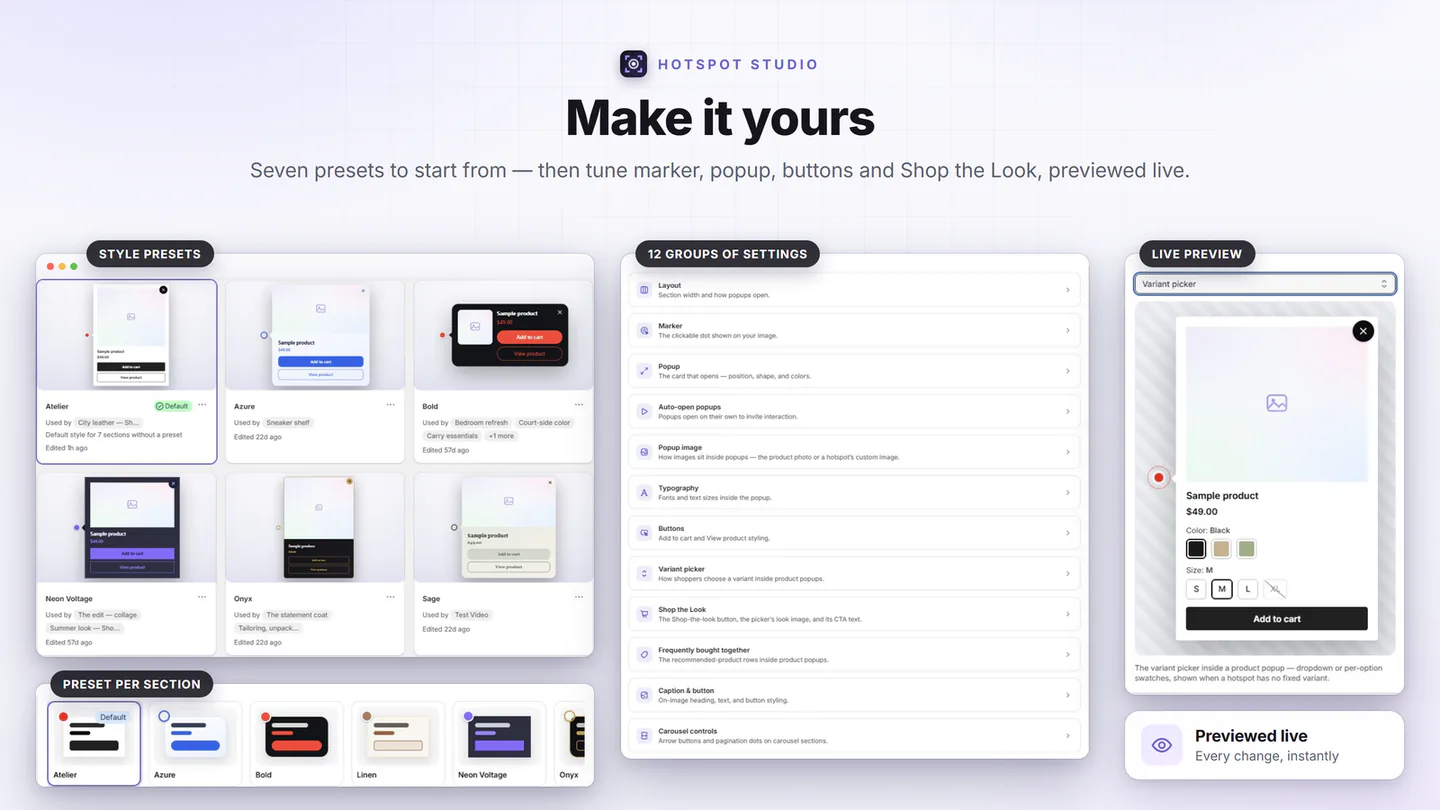
Start from Atelier, Bold, Onyx, Sage, Linen, Neon Voltage, or Azure — or let “Match my theme” read your theme’s colors and fonts in one reviewed step — then make it yours. Every visual detail is a setting, not a CSS hack.
- Markers — shape, size, border, six attention animations (pulse, beacon, breathe, ping, halo, heartbeat — staggered so dots don’t blink in unison), colors and shadow; popups open on click or on hover.
- Popups — width, radius, padding, solid or gradient backgrounds with glass opacity, borders, shadows, image position (full-bleed top or side thumbnail), 14 font choices plus custom font stacks.
- Typography, line by line — the title, price, description and the rest each get their own size, weight, line height and color, and the exact space below them, with their own sizes on phones.
- Buttons — solid / outline / soft styles with rest and hover colors for primary, secondary, Shop-the-Look, and caption buttons, laid out stacked, side by side, right of the text or under the image and text, with their own layout on phones; every label is editable (translate “Add to cart” into anything).
- Carousel chrome — arrow colors and size, dots/scrollbar color, even your own arrow image.
- Reusable — presets apply across sections; tweak one place, update everywhere. Per-section overrides when one experience needs to differ, and any preset exports to a file that imports into another store.
Drop in a photo — approve ready-made pins
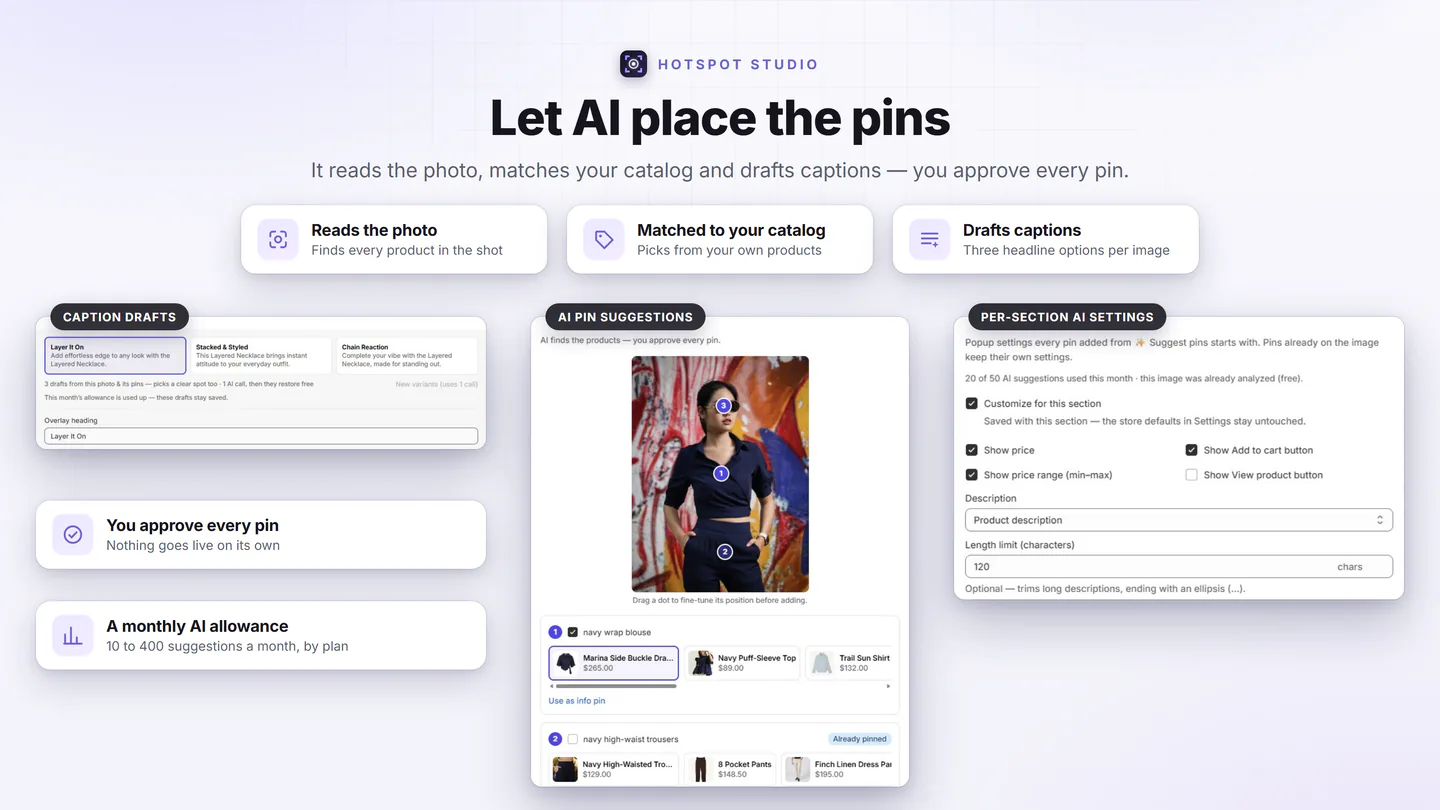
AI finds the products — you approve every pin. Pick a photo in the section editor, click “✨ Suggest pins,” and the AI reads the image, matches it against your store catalog, and proposes ready-made, draggable pins with candidate products. Nothing saves until you click “Add pins.”
- Catalog-matched, not generic — every suggestion is drawn from your own products, never a stock list.
- Still fully editable — drag a suggested pin to fine-tune its spot, swap the candidate product, or discard it before it ever touches your section.
- Captions too — “✨ Generate with AI” in Caption & button drafts three variants to pick from.
- Included on every plan — a fair-use monthly allowance (Free 10, Starter 50, Pro 150, Growth 400 suggestions).
A live preview that tells the truth
What you see in the editor is what renders on your storefront — same layouts, same popups, same styling, real product images and prices.
- Eleven one-click templates — Shop the Look, a Shop the look panel, a look with its product list, a bundle, Caption hero, Editorial story, Lookbook grid, Editorial masonry, Slider showcase, Product feature and Frequently bought together — each with its layout and a matching preset.
- Built-in crop & rotate — draw a crop box right on the photo (free-form, or 1:1, 4:5, 3:2, 16:9) or turn it 90°. Saves as a new file, the original stays in your store files — and every hotspot on the image moves to match the crop automatically.
- Draft → publish workflow — save without going live, publish when ready, and see an “unpublished changes” badge when the live version is stale. Cmd/Ctrl+S works.
- Scheduled publishing — pick a go-live date & time, and an optional take-down, and the section flips itself while you sleep. Starter and up.
- No lost work — unsaved-changes guards on navigation and tab close; archive instead of delete, restorable any time.
- Guided setup — an interactive checklist that detects your theme block automatically, plus a step-by-step guide with theme-editor deep links.
- Set up on a test theme — pick a working theme, and the Add block, theme editor and preview links open it, while shoppers keep seeing your live theme.
- Duplicate anything — clone a whole section with all images, hotspots, and settings.
The right section on the right page, by itself
Assign a section in the app and the storefront follows — no per-product theme fiddling, no duplicated templates.
- Products, variants, collections — one lookbook for a whole collection, a bespoke story for your hero product. Smart collections stay correct with zero syncing.
- Per-variant swaps — map colorways to different sections: when a shopper switches color, the whole section swaps in place, without a page reload.
- Pages, blog posts and the home page — two pages sharing one template can each show their own section; the home page is one checkbox.
- Several sections per page — each Hotspot Studio block takes the next free slot on its own. Assign one where another already shows, and the app lists what’s there and lets you show both, replace it, or keep it.
- Anywhere else — add the block and pick its section by a one-click Experience ID, or paste a snippet into a page or blog post’s content.
Revenue traced to the section — and to the pin
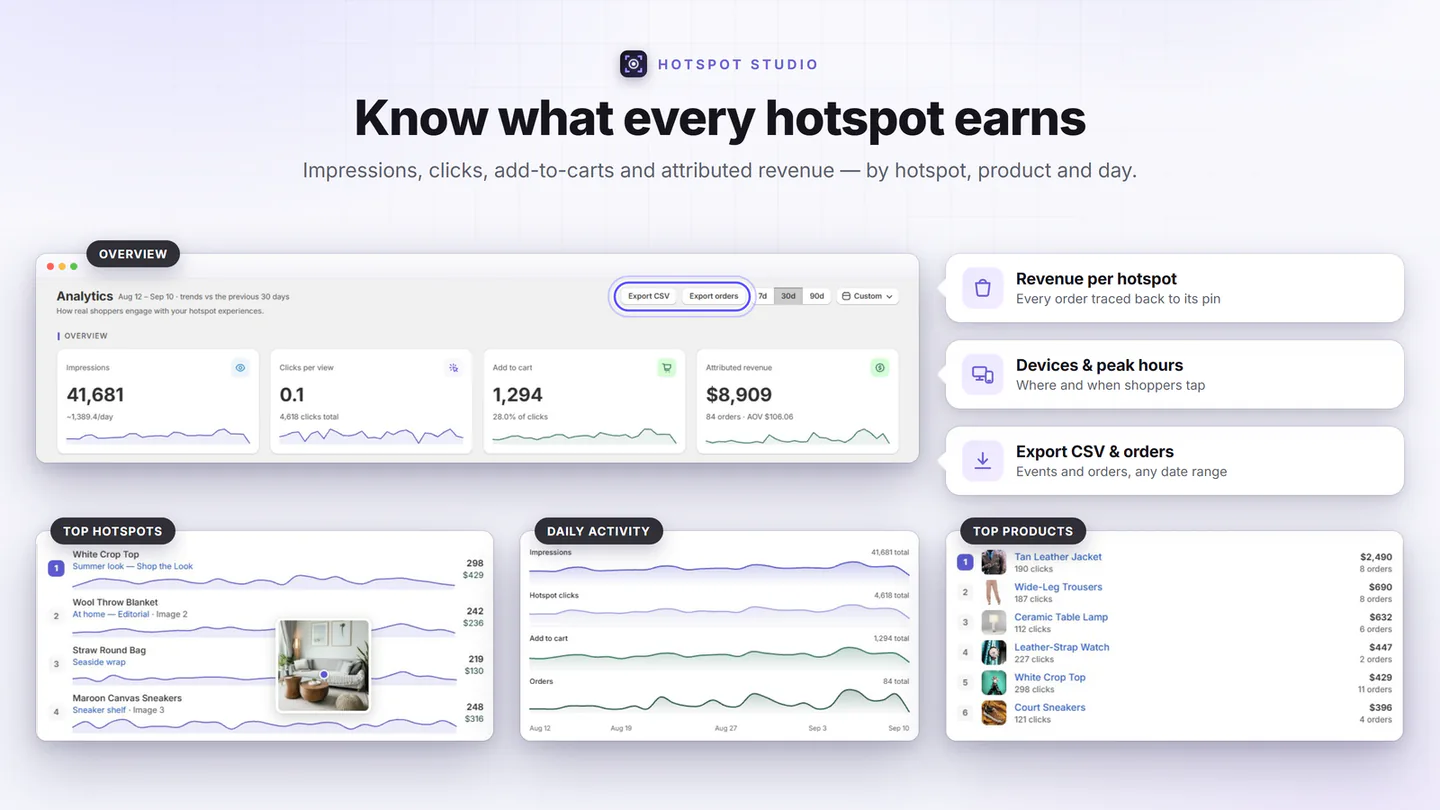
Every add-to-cart made through the app tags the order invisibly — so revenue lands on the section that earned it, and on the exact hotspot for adds from a popup. Refunds subtract automatically.
- The funnel — impressions → hotspot clicks → add to cart → orders, with attributed revenue and AOV.
- Daily trends — synchronized sparkline lanes for views, clicks, carts, and orders over 7 / 30 / 90 days or any custom range.
- Devices & hours — a mobile/desktop/tablet donut and a peak-hours chart in your store’s timezone.
- Leaderboards — top hotspots and top products by clicks, carts, orders, and revenue, deep-linked to their editors; every pin carries its own per-day trend and a preview of the image it sits on.
- Plain-language insights — “what the numbers say” summaries. Two CSV exports: the dashboard summary, and one row per attributed order — order number, look, hotspot, product, amount — so the revenue figure reconciles against Shopify’s own reports.
- Privacy-safe — anonymous and aggregate: no cookies, no identifiers, no consent banners needed.
The details competitors skip
Speaks your language
The admin comes in English, German, French, Spanish, Italian, Brazilian Portuguese and Dutch, and the block’s settings in the theme editor are translated too. Every storefront label is yours to reword.
Sharp on every screen
Popup photos come from Shopify’s CDN at the size your preset draws them, at 1x, 2x or 3x for the screen — crisp on a retina phone, light on everything else.
Cart drawer, your way
After any add: open the theme’s drawer (Dawn and Horizon supported out of the box), reload, go to cart, or do nothing and drive your own — with a custom selector fallback.
Seriously fast
A ~10 KB dependency-free core that hydrates lazily as sections scroll into view. Feature scripts load only when their feature is on — zero bytes otherwise.
Accessible by default
Focus-trapped dialogs, keyboard and screen-reader support, labelled controls, and reduced-motion respected — out of the box, on every theme.
Developer-friendly
Public JavaScript events for popup opens and cart adds, a re-render hook for AJAX themes, and copy-paste recipes — the full API surface is documented on the Developers page.
Edit your whole store from one spreadsheet
Download every section, change titles, layouts, presets, products, hotspots and even which products each section appears on in Excel or Google Sheets, then upload once — with built-in dropdowns, guardrails and a dry-run before anything goes live. Exporting — and importing into another store — is free on every plan; bulk-updating this store from the file is part of Growth.
See how bulk editing works →See it on your own products
The free plan includes three full sections with complete styling — enough to publish a real shoppable image today and judge for yourself.